

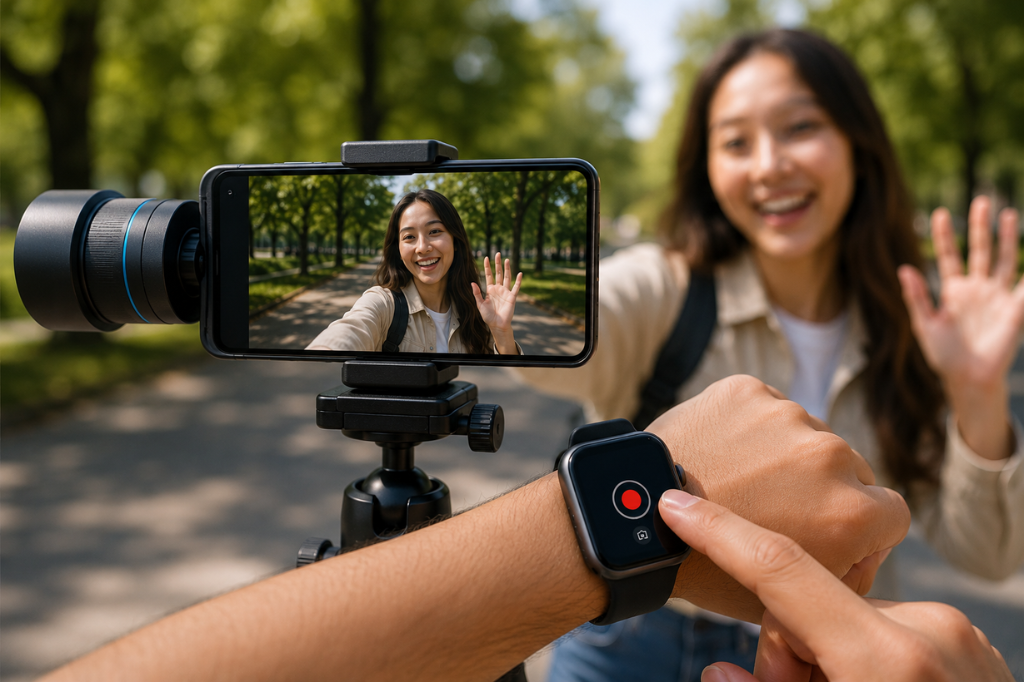
Blackmagic Design has introduced a major update to its popular Blackmagic Camera app, giving iPhone creators and vloggers a powerful new way to control video recording directly from an Apple Watch.
The latest Blackmagic Camera 3.3 update adds Apple Watch compatibility, allowing users to remotely monitor footage, start and stop recordings, apply LUTs, and control key camera settings straight from their wrist.
Apple Watch Becomes a Remote Camera Controller
The new feature is designed specifically for solo creators, vloggers, filmmakers, and mobile content producers who often work without a camera crew.
Once paired with an iPhone, the Apple Watch app provides:
- Live video preview
- Remote recording controls
- Audio level monitoring
- Lens switching
- Quick access to autofocus and exposure settings
- LUT and stabilization management
This allows creators to mount their iPhone on a tripod and fully control filming without touching the device.
Blackmagic Camera Continues to Challenge Pro Camera Apps
The Blackmagic Camera app has quickly become one of the most popular free professional camera apps for iPhone users.
Unlike the standard iPhone camera app, Blackmagic Camera offers:
- Full manual camera controls
- Shutter speed adjustment
- ISO and white balance controls
- ProRes video recording
- Advanced monitoring tools
- Cinematic LUT support
- Professional scopes and audio meters
Many competing apps require subscriptions or paid upgrades, but Blackmagic continues offering these features entirely free.
Advanced Video Features for Content Creators
The app also supports high end recording options including:
- 10 bit ProRes 422 Log video
- H.264 and H.265 codecs
- Open gate video capture
- Focus peaking and zebras
- False color monitoring
- Stereo audio meters
- Frame guides for vertical and horizontal content
Creators using newer iPhone Pro models can even record ProRes RAW video when connected to an external USB-C SSD.
Improved Stabilization for Professional Recording
The latest update also introduces stabilization support for ProRes RAW capture on newer iPhone Pro devices running iOS 26.1 or later.
Users can choose from three stabilization modes:
- Standard
- Cinematic
- Extreme
The Extreme mode is designed for heavy movement, such as running or action shots, though it applies a noticeable crop to footage.
Designed for Solo Filmmakers and Vloggers
The Apple Watch integration is one of the most practical additions for creators shooting alone. Users can now frame themselves, monitor recording, and manage settings remotely without relying on external monitors or assistants.
Although the Apple Watch display is small, early hands-on impressions suggest it works well enough for:
- Video selfies
- Mobile interviews
- Solo vlogging
- Travel content creation
- Social media videos
More Features for Live Streamers
Blackmagic Camera 3.3 also adds deeper integration with Blackmagic’s professional production ecosystem.
The app now supports:
- Remote iPhone control via ATEM Mini switchers
- Manual focus control using Blackmagic hardware
- Enhanced production workflows for livestream creators
These additions position the app as a more serious tool for mobile filmmaking and live broadcasting.
Conclusion
With the addition of Apple Watch remote controls and expanded professional video tools, Blackmagic Camera 3.3 is becoming one of the most powerful free video apps available for iPhone creators. The update gives vloggers and solo filmmakers greater flexibility while bringing professional level filmmaking features directly to mobile devices.
